

For more information on how to get up and running with the API library, see the JavaScript API Library.
Overview
The table below shows the mapping between the recommendations and where on a site to use them. It is important to understand the mapping is a suggestion and not a restriction forPOST requests. When configuring recommendation lists on pages in the Elevate application , the available algorithms are limited to TOP_PRODUCTS, PERSONAL, NEWEST_PRODUCTS, RECENTLY_VIEWED, and FAVORITES, since they target landing pages exclusively.
Add-to-cart recommendations
The add-to-cart recommendation is suitable to use in a popup that is displayed after the visitor has added an item to the cart. The variant that the visitor added to the cart is declared in thevariantKey query parameter. It uses previously notified add-to-cart events to know what is in the cart.
Example
- REST API
- JS Library
Contents of request-body.json
Alternatives
The Alternatives recommendation is suitable to use on a product details page. It returns products that are visually and functionally similar to the product the visitor is viewing. The product that the visitor is viewing is declared in theproductKey query parameter.
Example
- REST API
- JS Library
Contents of request-body.json
Cart
The Cart recommendation is suitable to use on a cart or a checkout page. It returns products that are likely to be bought based on the products in the visitor’s current cart.Example
- REST API
- JS Library
Contents of request-body.json
Favorite
The Favorite recommendation is suitable to use on the homepage or on a landing page. It returns products based on what a visitor has added to their favorite list, not the favorite list itself. It is important to remember that this recommendation performs better when there is a visitor with a known behavior that is identified via a customer key. For more information about identifying visitors, see visitor identification.Example
- REST API
- JS Library
Contents of request-body.json
More from series
The More from series recommendation is suitable to use on a product detail page. It returns products that belong to the same series as the source product. TheproductKey must be supplied in the query parameter for Elevate to list products from the same series. If that product does not belong to a series, the list will be empty. The series is defined in the catalog import, using the series attribute. Series are global for the entire product catalog, so if two brands have a series with the same name, attribute names can be used in v3 and translations in v4 — for example, the series ID value can be the series name concatenated with the brand, such as “Billy Ikea” for the series ID and “Billy” for the series name.
Example
- REST API
- JS Library
Contents of request-body.json
Newest products
The Newest products recommendation is suitable to use on a landing page dedicated to new arrivals. It returns products sorted by newness. Elevate determines newness based on thereleaseDate attribute supplied in the catalog import.
Example
- REST API
- JS Library
Contents of request-body.json
Personal
The Personal recommendation is suitable for use on the homepage or a landing page. It returns products related to what a visitor has interacted with. It is important to remember that this recommendation performs better when there is a visitor with a known behavior that is identified via a customer key. The recommendation backfills with products from the Top products recommendation. For more information about identifying visitors, see visitor identification.Example
- REST API
- JS Library
Contents of request-body.json
Recently viewed
The Recently viewed recommendation returns products recently viewed by the visitor. This recommendation type can, like other recommendation types, be used on any landing page and product detail page. And just like other recommendation types, Recently viewed supports product rules for including or excluding products.Example
- REST API
- JS Library
Contents of request-body.json
Style with
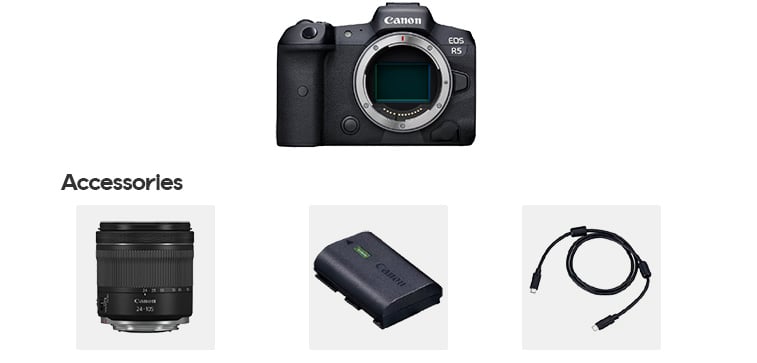
The Style with recommendation is suitable to use on a product details page. It returns products that go well together with the product currently viewed by a visitor. For example, a visitor is on the product detail page of a digital camera. The camera goes together with a certain type of accessories, such as a lens, a battery, and a cable. The product currently viewed is declared in theproductKey query parameter. The products that go together must be specified in the catalog import using the styleWith attribute.
Example
- REST API
- JS Library
Contents of request-body.json
Top products
The Top products recommendation is suitable to use on the homepage. It returns the most relevant products based on all visitors’ interactions, stock level, newness, and selected exposure strategy.Example
- REST API
- JS Library
Contents of request-body.json
Upsell
The Upsell recommendation is suitable to use on a product detail page. It returns recommendations that are complementary to, or likely to be bought together with, the viewed product, or likely to be considered by other visitors. TheproductKey must be supplied in the query parameter for Elevate to recommend other complementary products.
Example
- REST API
- JS Library
Contents of request-body.json
Tips
Combine recommendations
It is possible to combine two or more recommendations if relevant. For example,ALTERNATIVES can be combined with UPSELL on a product detail page. The homepage can include TOP_PRODUCTS and PERSONAL or FAVORITES. These combinations can be specified in the request body when sending a POST request.
Below is an example of a page configuration where the ALTERNATIVES and UPSELL recommendations are used.
Targeted recommendations
Apply product rules to have a more focused selection of product recommendations. For example, when using theTOP_PRODUCTS or NEWEST_PRODUCTS recommendation, the recommendation can be limited to a certain price range or certain categories. Product rules can be specified in the body of a page configuration.
Below is an example where the NEWEST_PRODUCTS recommendation is limited to the Kitchen supplies department/category. This example is relevant to apply for a landing page that highlights new arrivals within a specific category.
TOP_PRODUCTS recommendation is limited to products with prices up to 150 in the local currency.