- Increased resource usage
- Inflated usage metrics
- Skewed analytics and statistics
Allowing trusted bots
Some crawlers are necessary for SEO or platform integrations, such as:- Googlebot
- Bingbot
- LinkedInBot
- FacebookExternalHit
Managing crawler traffic
Not all automated traffic is harmful, but different types of crawlers must be handled differently to avoid inflated usage metrics.robots.txt
Userobots.txt to tell compliant crawlers which URLs on your own domain should not be crawled. This helps reduce unnecessary load from pages that would otherwise trigger Elevate API calls, such as internal search or utility URLs.
See more about robots.txt
Unwanted or aggressive bots
Some crawlers ignorerobots.txt entirely and may generate large numbers of Elevate sessions. These should be filtered or blocked server-side before any Elevate API calls are made.
Inspect the User-Agent header
Block requests that appear suspicious by checking the reported client identity. Requests with missing, malformed, or clearly fake identifiers should be denied immediately to prevent unauthorized or automated access.Rate-limit suspicious traffic
Throttle excessive traffic from individual IPs or networks to reduce the risk of abuse, denial-of-service attempts, and automated attacks. Resources:Monitor traffic sources
Regularly review logs for spikes from:- Unknown IP ranges
- Unusual geographies
- Known hosting providers or bot networks
Leveraging your CDN or hosting platform
Many CDNs and hosting platforms include automatic bot detection that flags “likely bot traffic”. Even so, this traffic may still reach your site and Elevate, since it is not always blocked outright, just identified. If your usage numbers indicate this, there are further steps you can take with your provider:- Request custom blocking rules, for example by country or network. Traffic from a region that has no relevance to your business is a common candidate for blocking.
- Ask for a challenge instead of a full block. A challenge (commonly a human-verification popup) is triggered when traffic to a specific endpoint from a specific source crosses a defined threshold, for example, more than 50 requests per minute to a search endpoint. This significantly reduces automated traffic without blocking legitimate users outright.
- Add endpoint-specific rate limits in your own application, particularly for “expensive” endpoints such as search. This lets you control the rate per IP directly, rather than relying solely on your provider. Keep in mind that this only reduces load on your own servers. The traffic still reaches your site, it does not necessarily prevent it from reaching Elevate.
Generalized approach to handling automated traffic
1
Classify trusted automated clients
Identify and explicitly allow well-known, legitimate automated clients that are required for core business functions, such as search engine indexing or integrations.
2
Detect and flag unknown or suspicious clients
Requests that do not match trusted automated clients or typical human-driven browsers should be treated as potentially automated and flagged for special handling.
3
Gracefully degrade functionality for suspected automation
Instead of blocking these clients outright, reduce the level of functionality and resource usage associated with their requests. This helps limit impact while avoiding unnecessary disruption.
4
Propagate classification to downstream systems
Ensure that the client classification is available throughout the request lifecycle so frontend behavior and third-party integrations can adapt accordingly.
5
Disable non-essential processing for flagged sessions
Turn off analytics, tracking, personalization, or other secondary services for suspected automated traffic to prevent amplification effects and traffic bursts.
Sequence diagrams
NGINX example
NGINX example for blocking suspicious bots and crawlers using user-agent filtering and rate limiting.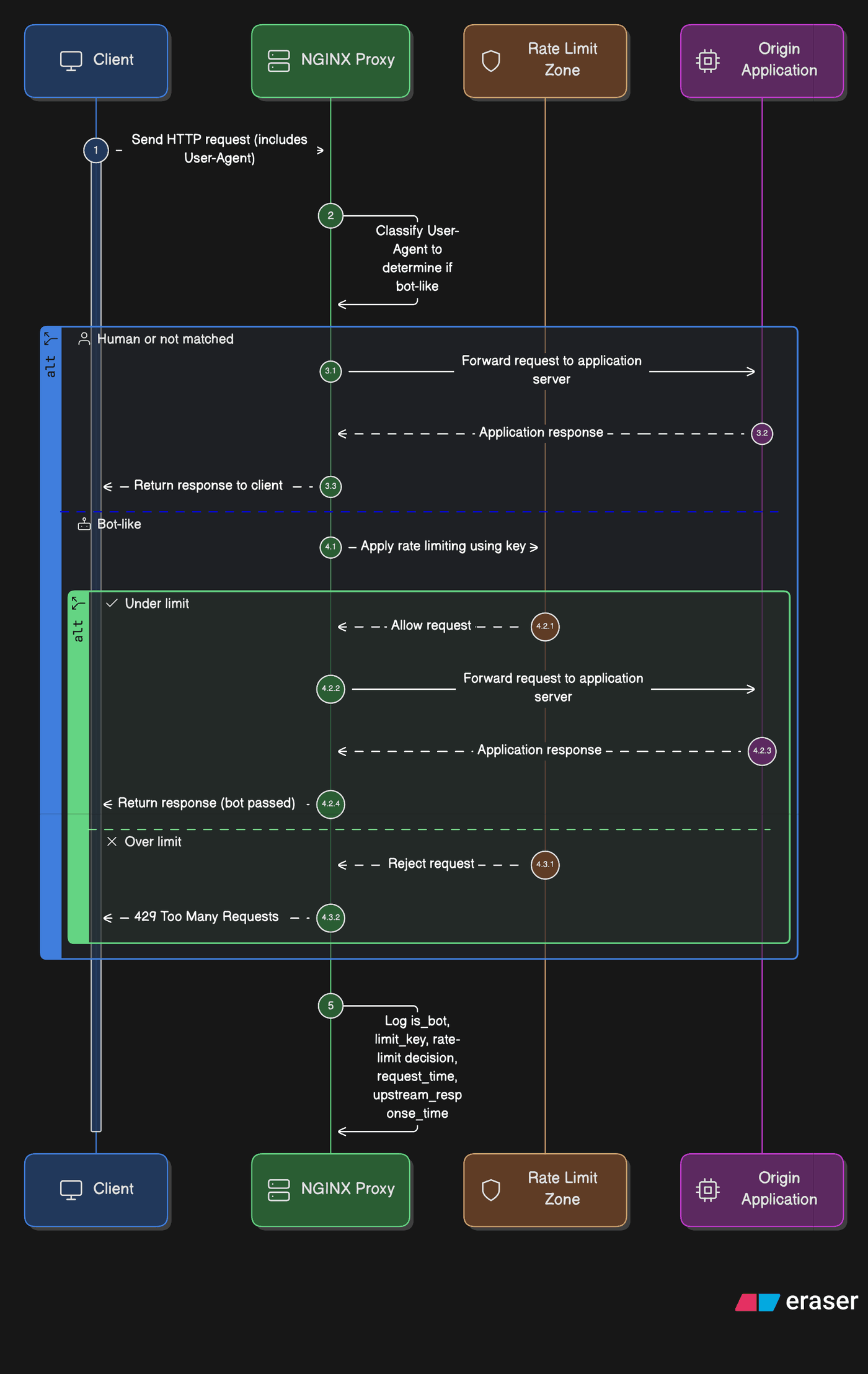
Application server example
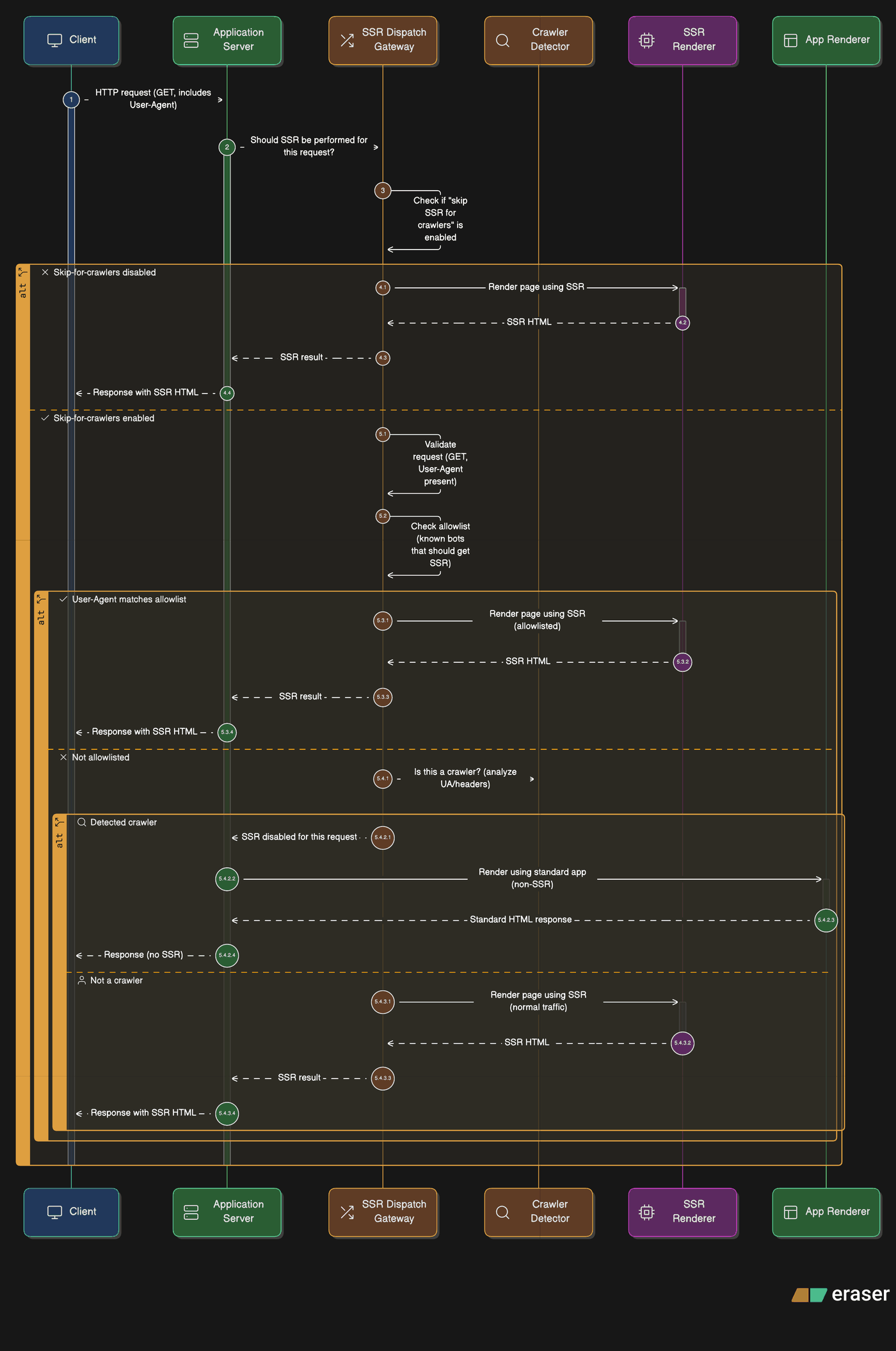
Application server example for server-side rendering (SSR) with a session limit for suspected bots and crawlers.