> ## Documentation Index
> Fetch the complete documentation index at: https://product-discovery.developer.voyado.com/llms.txt
> Use this file to discover all available pages before exploring further.
# Catalog concepts
> Learn how Voyado Elevate models catalog data with product groups, products, and variants, plus images, sizes, translations, and content items.
## Product data
An online retailer often sells articles in different colors or styles, and in different sizes or configurations. To describe an article and its properties, Voyado Elevate utilizes a model with three levels.
The first level is the product group (the overall article), the second level is the product (the style or color), and the third level is the variant (the SKU/size/configuration). The product is what is shown in a search result. Consider the image below, where the different types of ladies' tops are product groups, the colors of the different types are the products, and the sizes of the products are the variants.
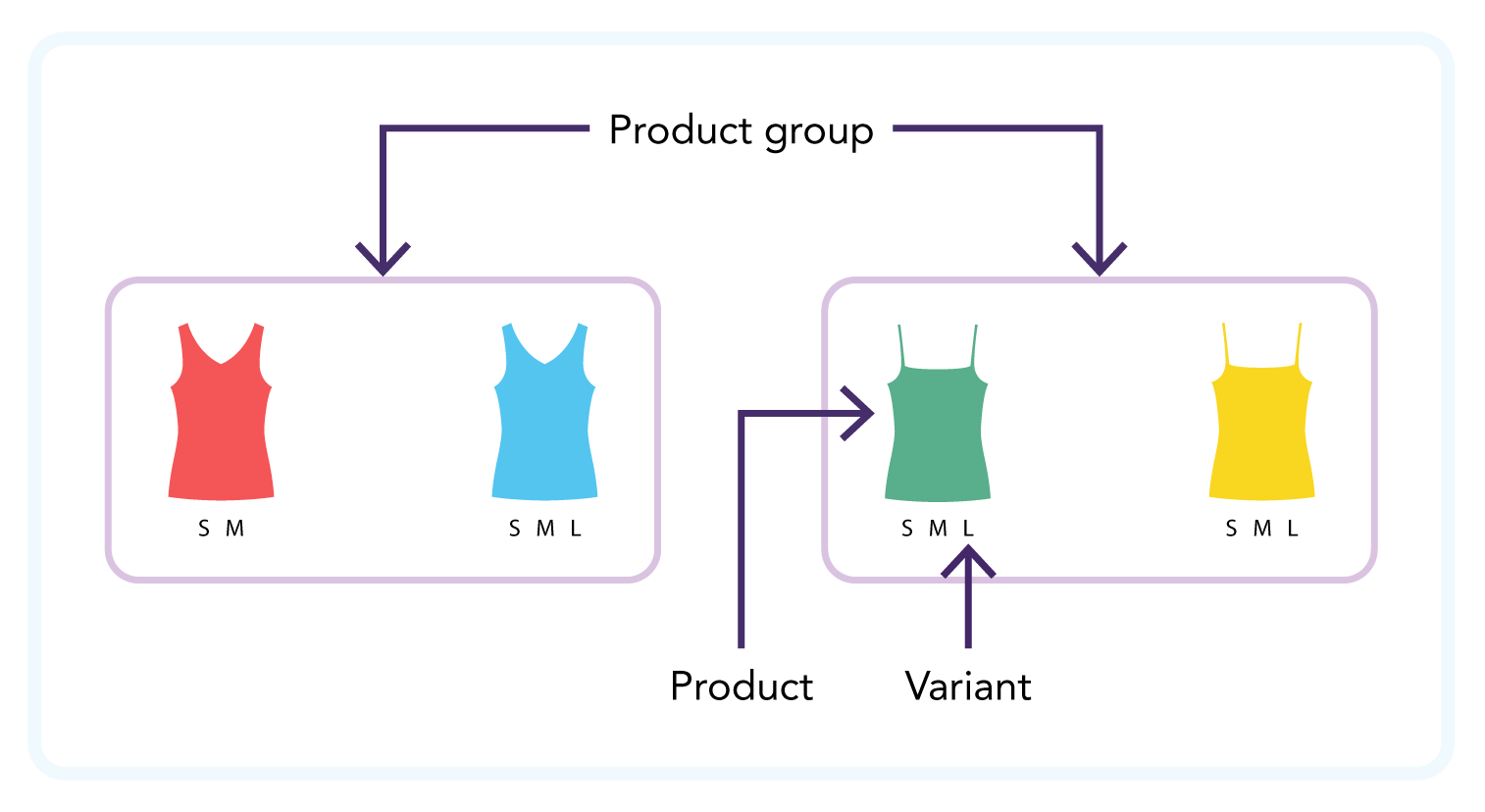 The properties of the articles, that is the product attributes, are also segmented. Overarching properties such as brand and department are at the product group level, while attributes such as images and material are at the product level. Attributes such as size, price, cost, and availability are at the variant level.
### Images
Images exist on the product level. Each image object defines a single image which may have URLs with different resolutions of the same image. Multiple resolutions are used for saving bandwidth and are especially useful for thumbnails. The following image file formats are supported: webp, png, jpg, and bmp.
An image element must have at least one URL and URLs must be unique within a product. If relative image resolutions are known, the image URLs should be ordered by ascending width, that is smallest first, otherwise it can lead to inconsistencies before it is analyzed automatically. There can be a maximum of 25 images on a product.
Image URLs that are of width 100 pixels or less are considered thumbnails and will be returned in the `thumbnail` field in the storefront API responses and not in the images array.
Additional attributes regarding image `tags`, `widths`, and `types` can be set in the import. These attributes are mainly for use before the automatic image analysis is complete. There is also support for custom image attributes and the `alt` and `caption` attributes.
### Sizes
Each variant has a single physical size, but the size can be expressed in several formats. For example, a shirt can be considered both a size S and sizes 34 and 36 simultaneously. If multiple formats are known, all should be provided.
Multiple variants with the same format and value are allowed, as long as there is one format with a unique single value for each variant. For example, having one variant of size S in SML format and 36 in EU format, and another variant of size M in SML format and 36 in EU format, is okay because the SML format has different values.
### Translations
Translation is a separate entity imported within a catalog feed and can be applied to a selection of custom and built-in attributes (see the [import overview](/elevate/docs/integration/catalog-imports/format-overview#translation) section for more details). A translation maps a property ID to a localized value and is used to localize presentational information while ensuring stable filters and product selections.
## Content
Content items enable visitors to search for content on the site, such as FAQs, shipping, and contact information.
The properties of the articles, that is the product attributes, are also segmented. Overarching properties such as brand and department are at the product group level, while attributes such as images and material are at the product level. Attributes such as size, price, cost, and availability are at the variant level.
### Images
Images exist on the product level. Each image object defines a single image which may have URLs with different resolutions of the same image. Multiple resolutions are used for saving bandwidth and are especially useful for thumbnails. The following image file formats are supported: webp, png, jpg, and bmp.
An image element must have at least one URL and URLs must be unique within a product. If relative image resolutions are known, the image URLs should be ordered by ascending width, that is smallest first, otherwise it can lead to inconsistencies before it is analyzed automatically. There can be a maximum of 25 images on a product.
Image URLs that are of width 100 pixels or less are considered thumbnails and will be returned in the `thumbnail` field in the storefront API responses and not in the images array.
Additional attributes regarding image `tags`, `widths`, and `types` can be set in the import. These attributes are mainly for use before the automatic image analysis is complete. There is also support for custom image attributes and the `alt` and `caption` attributes.
### Sizes
Each variant has a single physical size, but the size can be expressed in several formats. For example, a shirt can be considered both a size S and sizes 34 and 36 simultaneously. If multiple formats are known, all should be provided.
Multiple variants with the same format and value are allowed, as long as there is one format with a unique single value for each variant. For example, having one variant of size S in SML format and 36 in EU format, and another variant of size M in SML format and 36 in EU format, is okay because the SML format has different values.
### Translations
Translation is a separate entity imported within a catalog feed and can be applied to a selection of custom and built-in attributes (see the [import overview](/elevate/docs/integration/catalog-imports/format-overview#translation) section for more details). A translation maps a property ID to a localized value and is used to localize presentational information while ensuring stable filters and product selections.
## Content
Content items enable visitors to search for content on the site, such as FAQs, shipping, and contact information.