> ## Documentation Index
> Fetch the complete documentation index at: https://product-discovery.developer.voyado.com/llms.txt
> Use this file to discover all available pages before exploring further.
# Product list response templates
> Import response templates via the Admin API to trim product and variant fields in Storefront query responses, reducing response size for product lists.
Using templates is a way to optimize Elevate's query responses to only include data that is relevant for rendering your site. This can significantly reduce response sizes, resulting in a faster and more memory-efficient site with improved user experience and potentially lower hosting costs.
Additionally, by using a template, you no longer have to provide the `presentCustom` query parameter to specify which custom attributes to include in each request.
Consider the following example:
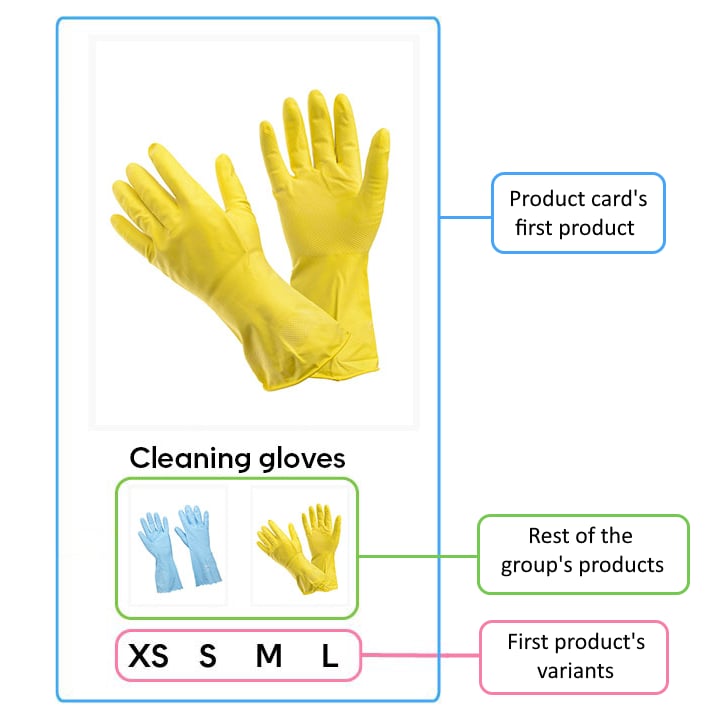 The product card has a primary product and two more products within the same product group, as well as multiple variants for each. While data for all of these is returned, only the image is used for the other products, and only the size is used for each variant.
The main beneficiaries of this feature are retailers who have product groups containing multiple products and variants. By default, Elevate returns data for all products within the group, for each product card, even if only the main product is rendered. This can result in a lot of repeated data that is shared between the products, or that is simply not used.
## Importing templates
Templates are imported via their own endpoint in the [Admin API](/elevate/docs/api/admin/v4/import/templates). You can import up to five different templates. The `PUT` endpoint replaces all existing templates with your import, while the `POST` endpoint will only add, update, or remove the templates listed in the import.
The template import uses dangerous import protection, so if your import were to remove an existing template it will fail, and you will be asked to redo the import with the header flag `force=true`.
## Template format
Templates are imported in JSON format. They consist of an ID, product level settings, and variant level settings. The template format is based on the product data in Storefront query responses. They have a primary (`first`) product, which is the one the product card belongs to, and a remainder (`rest`) consisting of the other products within the product group. You can either use separate rules for the `first` and `rest` of the products listed in the response, or the same rules for `all` of them. The same goes for variant data on each product.
Consider the example below:
```json icon="code" expandable theme={null}
{
"template1": {
"products": {
"first": {
"fields": [
"title", "link", "sellingPrice"
],
"variants": {
"all": {
"fields": [
"label", "custom.campaign"
]
}
}
},
"rest": {
"fields": [
"link", "swatch"
],
"maxVariants": 0
}
}
},
"template2": {
...
}
}
```
This example contains two templates with the IDs `template1` and `template2` respectively. While the content of `template2` has been omitted for brevity, the first template is defined as follows:
* For the first product in each group, return the `title`, `link`, and `sellingPrice`.
* For all its variants, return their `label` and custom `campaign` attribute.
* For other products in the group, return only the `link` and `swatch` fields.
* Include none of their variants.
As mentioned above, on product level, the `first` product refers to the main product to be rendered while the other products are alternatives or swatches (see the [modeling guide](/elevate/docs/guides/catalog-modeling/product-modeling-guide#elevate-response-object)). On the variant level, there is no "primary" variant. Therefore, it usually makes no sense to use `first` and `rest` on the variant level, as whichever variant is first in the response will be arbitrary. If you think there are variant fields that you don't need repeated for each variant, consider whether it's possible to raise them to the product level instead.
By using `maxVariants` you can specify how many variants should be included (at most) on each product. If you don't display sizes on product cards you might want to set this to 0 for the first and/or the rest of the products, as in the example above. The `variants` block may be omitted if `maxVariants` is 0.
It is generally recommended to use `first` and `rest` on product level and `all` on variant level. Exclude any fields you don't need, especially in the `rest` group, as most attributes are only relevant for the main product.
### Available fields
You can include any field specified in the API response. See the [Storefront specification](/elevate/docs/api/storefront/v3/queries/landing-page#product) for the full list. Custom attributes should be prefixed with `custom.` Additionally, the special syntax `custom.*` can be used to include all custom fields on a product or variant (this includes any typed custom fields). To include specific typed custom attributes, use the following prefixes: `custom.json.`, `custom.length.`, and `custom.number.` Note that `custom.json.*` and so on is not supported.
## Using templates
When you have imported a template, you can start applying it in Storefront queries by including `templateId` as a query parameter with the template ID to use. It can be applied to all requests that return product listings and will apply to all lists returned (for example, applying to both a page's primary list and recommendation lists). Note that on the product page, the template only applies to lists on the page and not to the main product the page belongs to: all of its fields will still be returned.
The following requests support templates:
* Add to cart popup
* Autocomplete
* Cart page
* Landing page
* Product page
* Search page
## Template examples
```json title="The default when no template is specified, with no custom attributes" icon="code" expandable theme={null}
{
"default": {
"products": {
"all": {
"fields": [
"swatch",
"inStock",
"depth",
"height",
"length",
"width",
"volume",
"weight",
"listPrice",
"sellingPrice",
"imageInfo",
"badges",
"brand",
"title",
"name",
"series",
"link",
"rating"
],
"variants": {
"all": {
"fields": [
"size",
"label",
"inStock",
"stockNumber",
"availability",
"prices",
"link",
"listPrice",
"sellingPrice",
"width",
"height",
"length",
"depth",
"volume",
"weight"
]
}
}
}
}
}
}
```
```json title="Limit information on swatches and variants, with all custom attributes" icon="code" expandable theme={null}
{
"template_id": {
"products": {
"first": {
"fields": [
"swatch",
"inStock",
"listPrice",
"sellingPrice",
"imageInfo",
"brand",
"title",
"link",
"custom.*"
],
"variants": {
"all": {
"fields": [
"label",
"inStock",
"sellingPrice",
"listPrice",
"custom.*"
]
}
}
},
"rest": {
"fields": [
"inStock",
"link"
],
"maxVariants": 0
}
}
}
}
```
The product card has a primary product and two more products within the same product group, as well as multiple variants for each. While data for all of these is returned, only the image is used for the other products, and only the size is used for each variant.
The main beneficiaries of this feature are retailers who have product groups containing multiple products and variants. By default, Elevate returns data for all products within the group, for each product card, even if only the main product is rendered. This can result in a lot of repeated data that is shared between the products, or that is simply not used.
## Importing templates
Templates are imported via their own endpoint in the [Admin API](/elevate/docs/api/admin/v4/import/templates). You can import up to five different templates. The `PUT` endpoint replaces all existing templates with your import, while the `POST` endpoint will only add, update, or remove the templates listed in the import.
The template import uses dangerous import protection, so if your import were to remove an existing template it will fail, and you will be asked to redo the import with the header flag `force=true`.
## Template format
Templates are imported in JSON format. They consist of an ID, product level settings, and variant level settings. The template format is based on the product data in Storefront query responses. They have a primary (`first`) product, which is the one the product card belongs to, and a remainder (`rest`) consisting of the other products within the product group. You can either use separate rules for the `first` and `rest` of the products listed in the response, or the same rules for `all` of them. The same goes for variant data on each product.
Consider the example below:
```json icon="code" expandable theme={null}
{
"template1": {
"products": {
"first": {
"fields": [
"title", "link", "sellingPrice"
],
"variants": {
"all": {
"fields": [
"label", "custom.campaign"
]
}
}
},
"rest": {
"fields": [
"link", "swatch"
],
"maxVariants": 0
}
}
},
"template2": {
...
}
}
```
This example contains two templates with the IDs `template1` and `template2` respectively. While the content of `template2` has been omitted for brevity, the first template is defined as follows:
* For the first product in each group, return the `title`, `link`, and `sellingPrice`.
* For all its variants, return their `label` and custom `campaign` attribute.
* For other products in the group, return only the `link` and `swatch` fields.
* Include none of their variants.
As mentioned above, on product level, the `first` product refers to the main product to be rendered while the other products are alternatives or swatches (see the [modeling guide](/elevate/docs/guides/catalog-modeling/product-modeling-guide#elevate-response-object)). On the variant level, there is no "primary" variant. Therefore, it usually makes no sense to use `first` and `rest` on the variant level, as whichever variant is first in the response will be arbitrary. If you think there are variant fields that you don't need repeated for each variant, consider whether it's possible to raise them to the product level instead.
By using `maxVariants` you can specify how many variants should be included (at most) on each product. If you don't display sizes on product cards you might want to set this to 0 for the first and/or the rest of the products, as in the example above. The `variants` block may be omitted if `maxVariants` is 0.
It is generally recommended to use `first` and `rest` on product level and `all` on variant level. Exclude any fields you don't need, especially in the `rest` group, as most attributes are only relevant for the main product.
### Available fields
You can include any field specified in the API response. See the [Storefront specification](/elevate/docs/api/storefront/v3/queries/landing-page#product) for the full list. Custom attributes should be prefixed with `custom.` Additionally, the special syntax `custom.*` can be used to include all custom fields on a product or variant (this includes any typed custom fields). To include specific typed custom attributes, use the following prefixes: `custom.json.`, `custom.length.`, and `custom.number.` Note that `custom.json.*` and so on is not supported.
## Using templates
When you have imported a template, you can start applying it in Storefront queries by including `templateId` as a query parameter with the template ID to use. It can be applied to all requests that return product listings and will apply to all lists returned (for example, applying to both a page's primary list and recommendation lists). Note that on the product page, the template only applies to lists on the page and not to the main product the page belongs to: all of its fields will still be returned.
The following requests support templates:
* Add to cart popup
* Autocomplete
* Cart page
* Landing page
* Product page
* Search page
## Template examples
```json title="The default when no template is specified, with no custom attributes" icon="code" expandable theme={null}
{
"default": {
"products": {
"all": {
"fields": [
"swatch",
"inStock",
"depth",
"height",
"length",
"width",
"volume",
"weight",
"listPrice",
"sellingPrice",
"imageInfo",
"badges",
"brand",
"title",
"name",
"series",
"link",
"rating"
],
"variants": {
"all": {
"fields": [
"size",
"label",
"inStock",
"stockNumber",
"availability",
"prices",
"link",
"listPrice",
"sellingPrice",
"width",
"height",
"length",
"depth",
"volume",
"weight"
]
}
}
}
}
}
}
```
```json title="Limit information on swatches and variants, with all custom attributes" icon="code" expandable theme={null}
{
"template_id": {
"products": {
"first": {
"fields": [
"swatch",
"inStock",
"listPrice",
"sellingPrice",
"imageInfo",
"brand",
"title",
"link",
"custom.*"
],
"variants": {
"all": {
"fields": [
"label",
"inStock",
"sellingPrice",
"listPrice",
"custom.*"
]
}
}
},
"rest": {
"fields": [
"inStock",
"link"
],
"maxVariants": 0
}
}
}
}
```