> ## Documentation Index
> Fetch the complete documentation index at: https://product-discovery.developer.voyado.com/llms.txt
> Use this file to discover all available pages before exploring further.
# Retail Media
> Overview of retail media in Elevate, covering sponsored lists, sponsored slices, real-time bidding, and the four steps to integrate them.
Retail Media features are currently in beta. Contact your Customer Success Manager to learn more.
This section provides an overview of the retail media concept and the features related to retail media within Elevate.
For user guides and additional information on Retail Media, see:
## What is retail media
Retail Media entails product placement — suppliers paying to have their products exposed to customers. This can be a lucrative secondary income source for a retailer with many suppliers or competitive product categories.
In Elevate, this is done through sponsored product lists and sponsored slices, where brands compete through a real-time bidding system. Elevate then uses its ranking logic to select which of the winner's products to display given the current context, so the products displayed are still curated and relevant for the visitor.
 ## Features
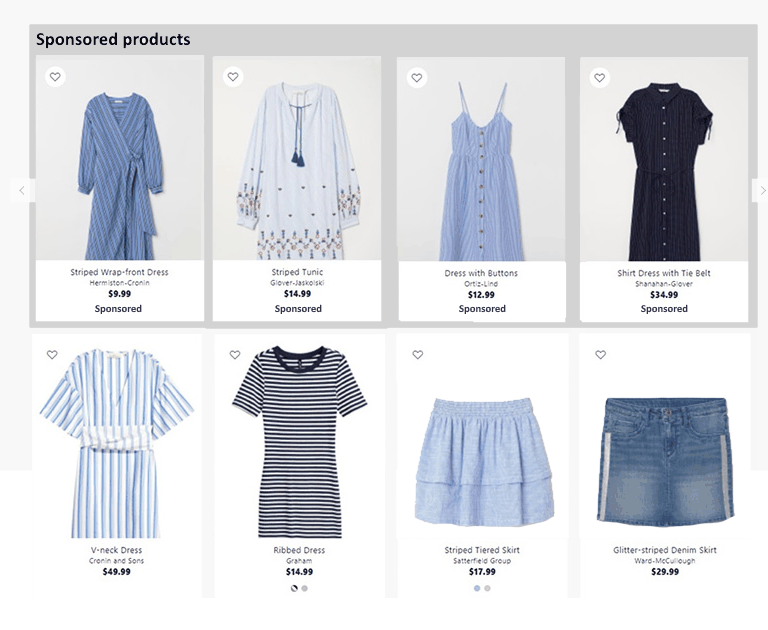
Sponsored products can be displayed on landing and category pages using two features: sponsored lists and sponsored slices.
### Sponsored lists
Sponsored lists are set up in the Elevate App and work similarly to a normal recommendation list. You can specify which product category should be displayed in the list, or let Elevate base the category on the page's primary list. When a supplier sets up bidding for that category, the list is populated by products matching both criteria: belonging to the selected category and being of the winning brand.
Elevate supports having multiple winners represented in a single list, allowing Elevate to choose the best options from a wider array of products.
### Sponsored slices
With sponsored slices, you select a region of a page's primary list to fill with sponsored results. Elevate then pulls products from the winning brand(s) to fill the sponsored area, similar to how a regular slice works. The key difference is that the exact content of the slice isn't defined in advance and is chosen when the list is requested. Elevate will still only pick products that would otherwise be displayed somewhere on the page, further down in the result, to ensure the products remain relevant.
Products in the sponsored area are affected by any filters applied by the visitor, such as color or size. To keep the list consistent, Elevate tracks which products were sponsored on each page and returns the same set in all requests for that page during a session.
## Integration
Integrating retail media comes in four steps:
Have Voyado set up a campaign management account for your company, used to create ad campaigns for your suppliers.
If needed, update your product feed with the required fields.
Create sponsored lists and/or sponsored slices for all relevant pages.
Update your storefront to support displaying sponsored products.
## Features
Sponsored products can be displayed on landing and category pages using two features: sponsored lists and sponsored slices.
### Sponsored lists
Sponsored lists are set up in the Elevate App and work similarly to a normal recommendation list. You can specify which product category should be displayed in the list, or let Elevate base the category on the page's primary list. When a supplier sets up bidding for that category, the list is populated by products matching both criteria: belonging to the selected category and being of the winning brand.
Elevate supports having multiple winners represented in a single list, allowing Elevate to choose the best options from a wider array of products.
### Sponsored slices
With sponsored slices, you select a region of a page's primary list to fill with sponsored results. Elevate then pulls products from the winning brand(s) to fill the sponsored area, similar to how a regular slice works. The key difference is that the exact content of the slice isn't defined in advance and is chosen when the list is requested. Elevate will still only pick products that would otherwise be displayed somewhere on the page, further down in the result, to ensure the products remain relevant.
Products in the sponsored area are affected by any filters applied by the visitor, such as color or size. To keep the list consistent, Elevate tracks which products were sponsored on each page and returns the same set in all requests for that page during a session.
## Integration
Integrating retail media comes in four steps:
Have Voyado set up a campaign management account for your company, used to create ad campaigns for your suppliers.
If needed, update your product feed with the required fields.
Create sponsored lists and/or sponsored slices for all relevant pages.
Update your storefront to support displaying sponsored products.